Achraf Ben Alaya
No Result
View All Result
  • Home
  • News
  • Blog
    • blazor
    • c#
    • Cloud
      • Azure
    • docker
    • sql
    • xamarin
    • Dapr
    • Tricks, Tips and Fixes
    • General Tips & Fix
  • AI
  • Cloud
  • Motivation
  • Courses
  • About
    • Resume
    • Privacy Policy
SUBSCRIBE
  • Home
  • News
  • Blog
    • blazor
    • c#
    • Cloud
      • Azure
    • docker
    • sql
    • xamarin
    • Dapr
    • Tricks, Tips and Fixes
    • General Tips & Fix
  • AI
  • Cloud
  • Motivation
  • Courses
  • About
    • Resume
    • Privacy Policy
No Result
View All Result
Achraf Ben Alaya
No Result
View All Result
ADVERTISEMENT
Home Blog Cloud Azure

Migrate and modernize your applications on Azure – Part 2.0 (Azure Functions)

achraf by achraf
April 3, 2021
in Azure, Blog, Cloud
2 min read
0
Migrate and modernize your applications on Azure
0
SHARES
579
VIEWS
Share on FacebookShare on Twitter

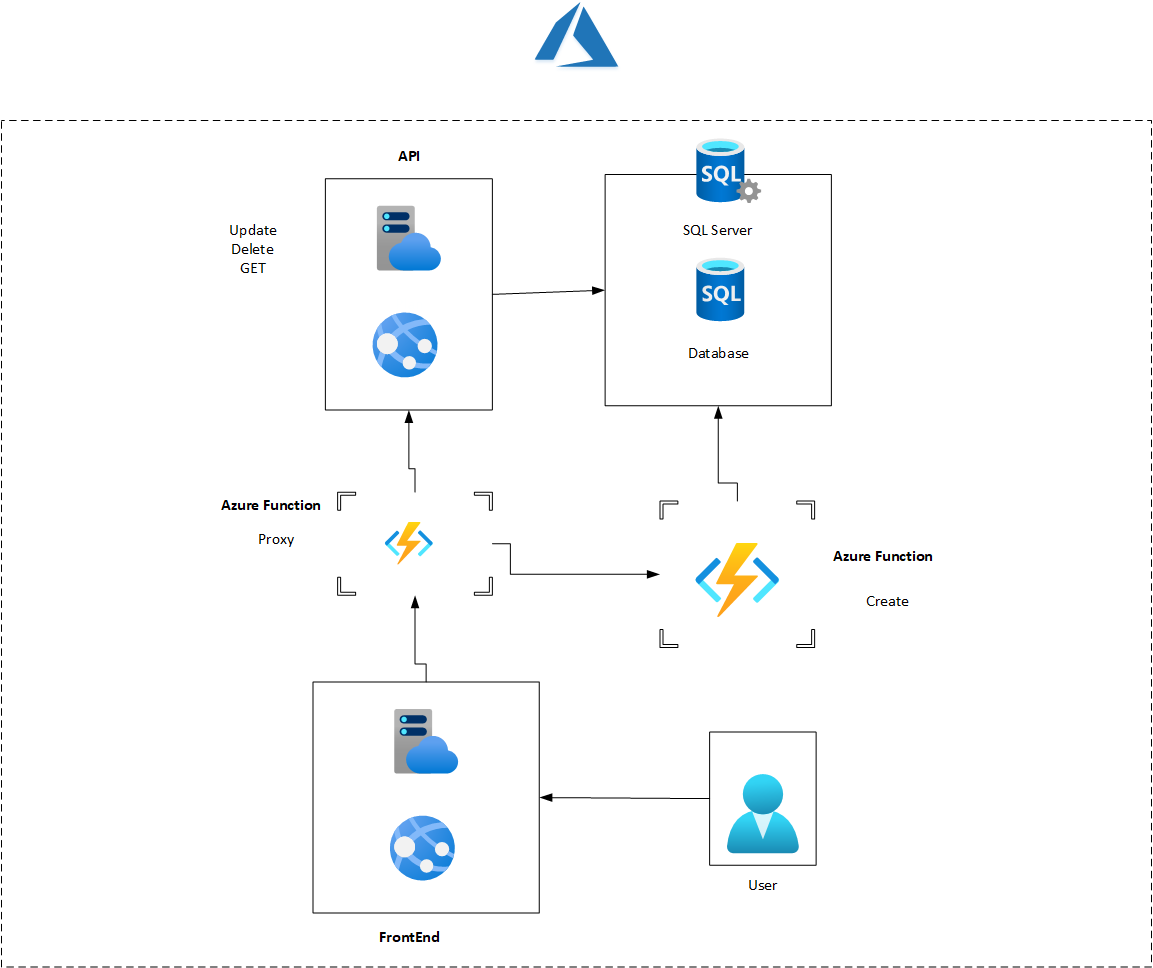
After we have created and published our application to azure , it’s time now to modernize it accelerate and simplify application development with serverless compute using the azure function .

The first azure function that we are going to create will play the role of add-task , so instead of using the API we will use this azure function to do the add task job .

Functions can be written in a variety of languages, and will automatically trigger and scale based on your application needs.

Creating the azure Function

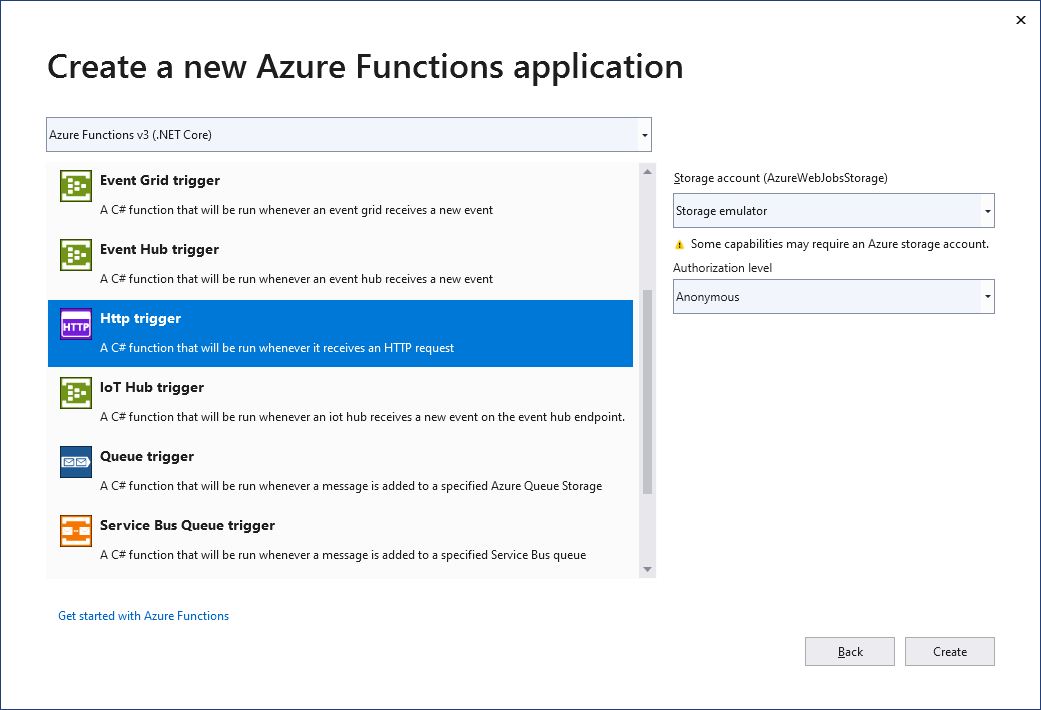
In order to create our azure function ,first we need to clique on the solution in order to add a new project and than from the templates we are going to look for function .
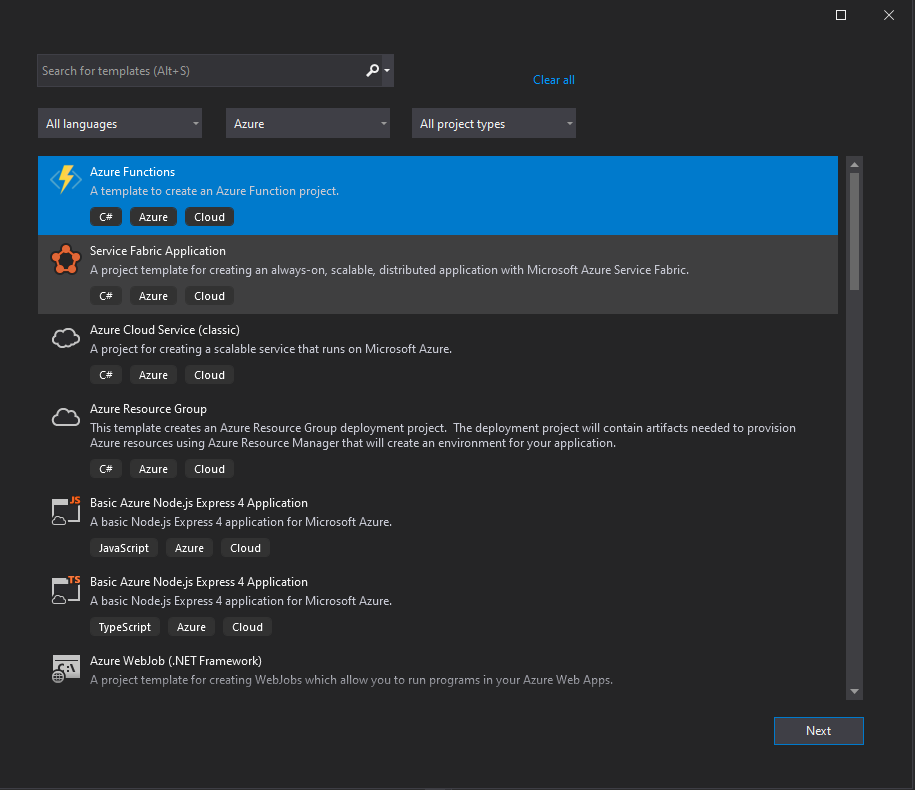
next for the setting of the app we will follow the below table
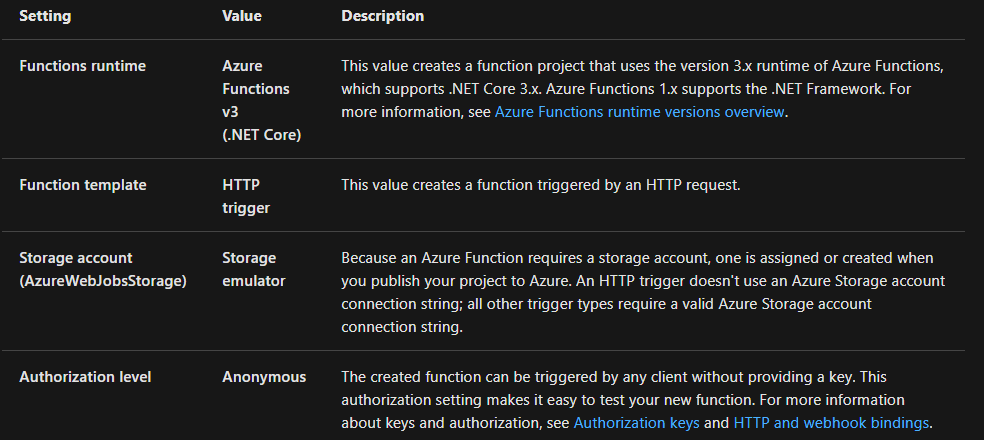
PS : Make sure you set the Authorization level to Anonymous. If you choose the default level of Function, you’re required to present the function key in requests to access your function endpoint.

Visual Studio creates a project and class that contains boilerplate code for the HTTP trigger function type. The boilerplate code sends an HTTP response that includes a value from the request body or query string. The HttpTrigger attribute specifies that the function is triggered by an HTTP request.

If you follow the video below on the blog we will end up having a function like this :

public  class Function1
 {

     private readonly TaskDbContext _TaskDbContext;
     public Function1(TaskDbContext TaskDbContext)
     {
         _TaskDbContext = TaskDbContext;
     }

     [FunctionName("CreateTodo")]
     public async Task<IActionResult> Run(
         [HttpTrigger(AuthorizationLevel.Anonymous, "post", Route = null)] HttpRequest req,
         ILogger log)
     {


         log.LogInformation("Creating a new todo list item");
         var requestBody = await new StreamReader(req.Body).ReadToEndAsync();
         var input = JsonConvert.DeserializeObject<ToDo>(requestBody);
         var todo = new ToDo { Name = input.Name, Priority = input.Priority, URD = System.DateTime.Now.ToString() };
         await _TaskDbContext.todo.AddAsync(todo);
         await _TaskDbContext.SaveChangesAsync();
         return new OkObjectResult(input);
     }
 }

The function will create a task based on the ToDo Model .

To see how to create and publish the function you can find detailed explanation below .

ShareTweet
Previous Post

Migrate and modernize your applications on Azure – Part –1 (Migrate Database)

Next Post

Migrate and modernize your applications on Azure – Part 2.0 (Proxy Function)

Related Posts

Blog

 2025 – Certifications, Community, and 50K Views

December 28, 2025
52
Azure

From Manual Terraform to AI-Assisted DevOps: Building an Azure Container Platform (Part 1)

December 23, 2025
60
AI

Build and Host an Expense Tracking MCP Server with Azure Functions

November 2, 2025
714
Azure

Log Analytics Workspace Chaos: How We Tamed 100+ Orphaned Workspaces

October 17, 2025
210
Azure

Honored to be recognized as a Microsoft Azure MVP for 2025-2026

July 20, 2025
137
AI

Model Context Protocol (MCP): The Future of AI Integration

April 21, 2025
320
Next Post
Migrate and modernize your applications on Azure

Migrate and modernize your applications on Azure – Part 2.0 (Proxy Function)

Leave a Reply Cancel reply

Your email address will not be published. Required fields are marked *

Terraform

Certifications

Microsoft certified trainer (MCT)

Recommended

From Docker Hub, switch to Azure Container Registry & AKS

January 16, 2023
588
Azure Tips

Azure Tips

April 28, 2020
490
My book collection for 2020-2021

My book collection for 2020-2021

December 28, 2020
604
Streamlining Website Editing on My Local Machine with Docker Compose and WordPress

Streamlining Website Editing on My Local Machine with Docker Compose and WordPress

July 1, 2023
193
Part 5-A : Using Azure DevOps, Automate Your CI/CD Pipeline and Your Deployments

Part 5-C : Using Azure DevOps, Automate Your CI/CD Pipeline and Your Deployments

May 2, 2023
748
Exploring the Future: Microsoft Ignite Paris Highlights, Copilot Innovations, and Advanced Security Solutions

Exploring the Future: Microsoft Ignite Paris Highlights, Copilot Innovations, and Advanced Security Solutions

December 18, 2023
166
Facebook Twitter LinkedIn Youtube

 2025 – Certifications, Community, and 50K Views

December 28, 2025

From Manual Terraform to AI-Assisted DevOps: Building an Azure Container Platform (Part 1)

December 23, 2025

Build and Host an Expense Tracking MCP Server with Azure Functions

November 2, 2025

Categories

  • AI (3)
  • Apps (1)
  • Azure (67)
  • blazor (2)
  • Blog (94)
  • c# (7)
  • Cloud (69)
  • Courses (4)
  • Dapr (4)
  • docker (4)
  • Games (1)
  • General Tips & Fix (1)
  • Home (1)
  • Kubernetes Service (AKS) (1)
  • motivation (2)
  • Motivation (3)
  • News (9)
  • Resume (1)
  • sql (4)
  • Terrafrom (2)
  • Tricks, Tips and Fixes (4)
  • xamarin (5)
No Result
View All Result
  • Home
  • News
  • Blog
    • blazor
    • c#
    • Cloud
      • Azure
    • docker
    • sql
    • xamarin
    • Dapr
    • Tricks, Tips and Fixes
    • General Tips & Fix
  • AI
  • Cloud
  • Motivation
  • Courses
  • About
    • Resume
    • Privacy Policy

ADVERTISEMENT