Achraf Ben Alaya
No Result
View All Result
  • Home
  • News
  • Blog
    • blazor
    • c#
    • Cloud
      • Azure
    • docker
    • sql
    • xamarin
    • Dapr
    • Tricks, Tips and Fixes
    • General Tips & Fix
  • AI
  • Cloud
  • Motivation
  • Courses
  • About
    • Resume
    • Privacy Policy
SUBSCRIBE
  • Home
  • News
  • Blog
    • blazor
    • c#
    • Cloud
      • Azure
    • docker
    • sql
    • xamarin
    • Dapr
    • Tricks, Tips and Fixes
    • General Tips & Fix
  • AI
  • Cloud
  • Motivation
  • Courses
  • About
    • Resume
    • Privacy Policy
No Result
View All Result
Achraf Ben Alaya
No Result
View All Result
ADVERTISEMENT
Home Blog Cloud Azure

Welcome to Azure Resource Mover service

Azure Resource Mover is currently in public preview.

achraf by achraf
February 2, 2021
in Azure, Blog, Cloud
5 min read
0
Welcome to Azure Resource Mover service
0
SHARES
289
VIEWS
Share on FacebookShare on Twitter

Introduction

When you create new resources , you need to choose where are you going to host those resources ,and here we talk about the region .

It is very important to choose were you are going to host your resources , for example let’s say you have created a backend for your service in France and you have created the Front-End (web app ) in East Asia .

well from this point we can see that you may encounter high latency issue because the Front-End and the backend are in deferent areas  more than that , you should consider saving money $$ too .

Saving Money

By comparing regions within your desired “area” as illustrated in picture below, the savings over a quantity of instances can be significant. Good region selection is fundamental to controlling Azure costs, and for costs across the other clouds as well.
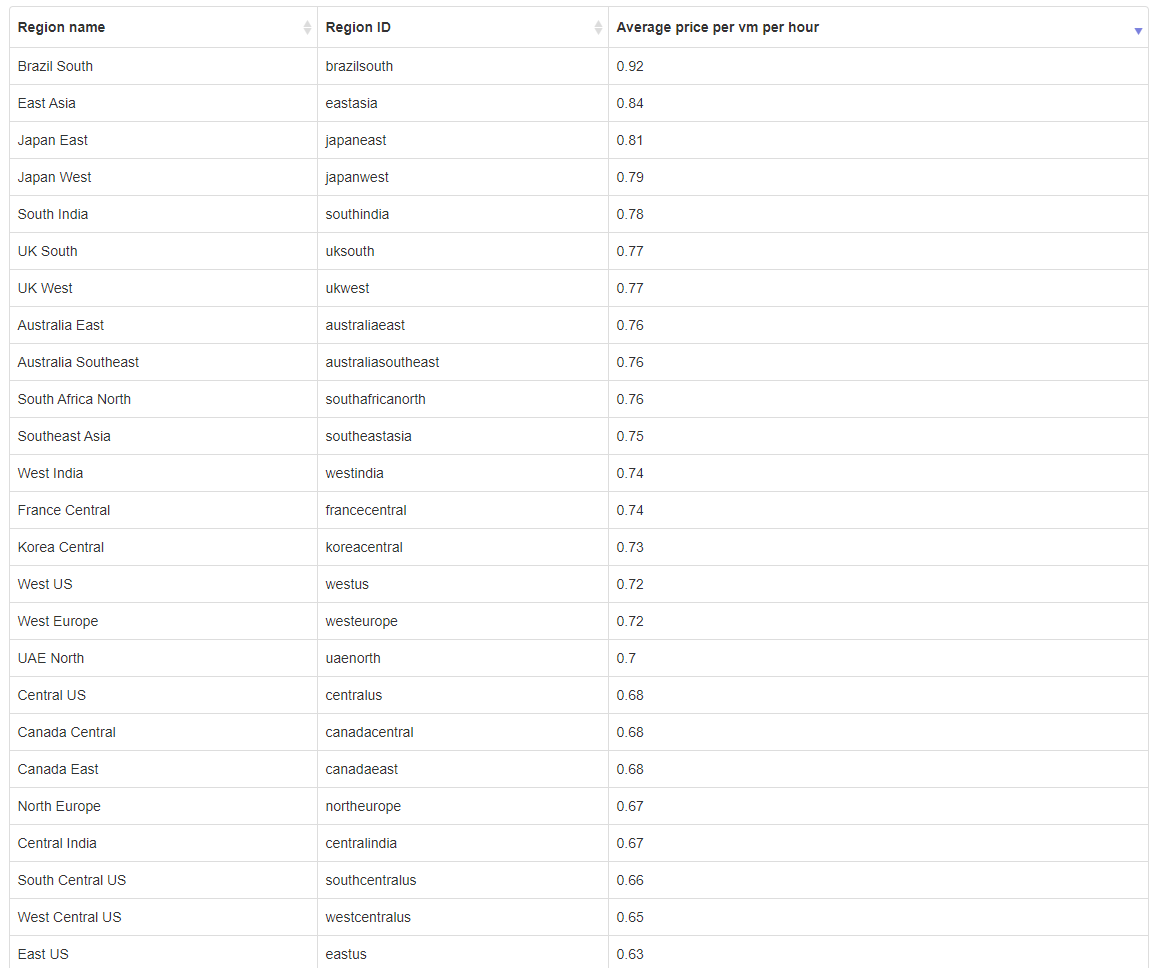
 

simple calculation : 0.92*720hours (brazil south) =662.4$ , 
0.68(canada central) *720=489.6 $

You might move resources to different Azure regions to:

  • Align to a region launch: Move resources to a newly introduced Azure region that wasn’t previously available.
  • Align for services/features: Move resources to take advantage of services or features that are available in a specific region.
  • Respond to business developments: Move resources to a region in response to business changes, such as mergers or acquisitions.
  • Align for proximity: Move resources to a region local to your business.
  • Meet data requirements: Move resources to align with data residency requirements, or data classification needs.
  • Respond to deployment requirements: Move resources that were deployed in error, or move in response to capacity needs.
  • Respond to decommissioning: Move resources because a region is decommissioned.

What resources can I move across regions?

Using Resource Mover, you can currently move the following resources across regions:

  • Azure VMs and associated disks
  • NICs
  • Availability sets
  • Azure virtual networks
  • Public IP addresses
  • Network security groups (NSGs)
  • Internal and public load balancers
  • Azure SQL databases and elastic pools


How to ?

To move resources across regions, you select the resources that you want to move. Resource Mover validates those resources, and resolves any dependencies they have on other resources.

In this demo we are going to move a SQL-Server and databases from East-US to France .

What we already have ?

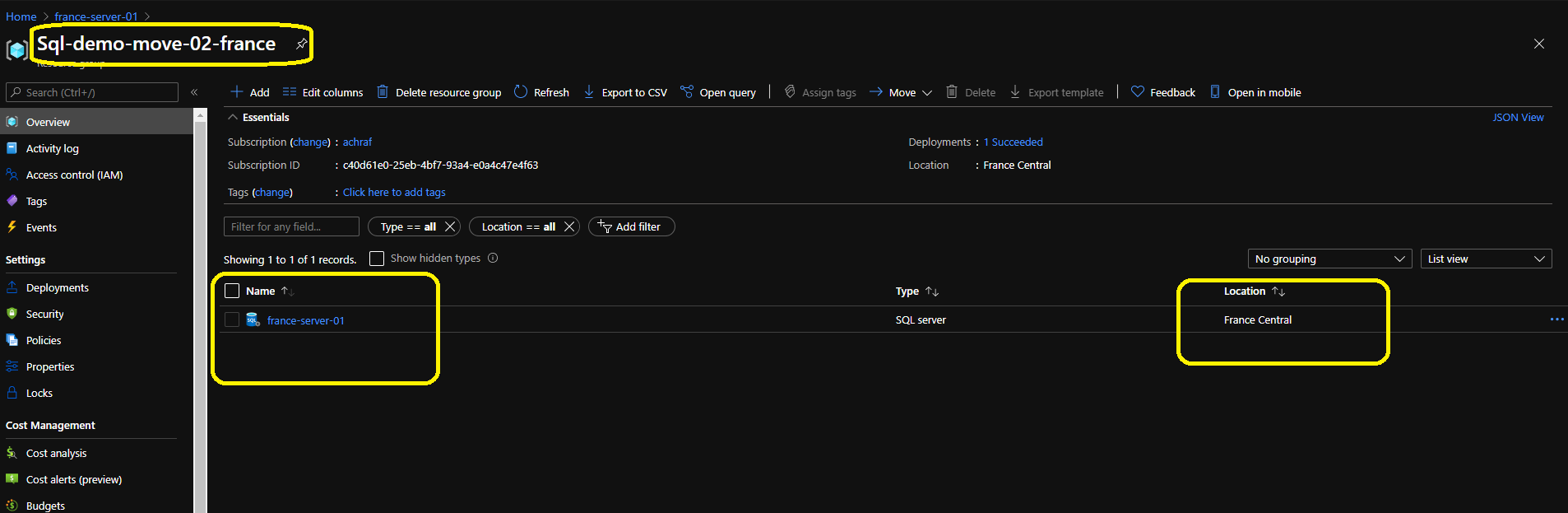
We have a SQL-Server that contain a database and that database contain one table .
This SQL server is East-US and we have been asked to move it to France central .

PS : Do not forget to Update database connection strings before you commit.

Follow the steps below to migrate your resources from region to region .

Here we create the resource group where we are going to migrate our resources.

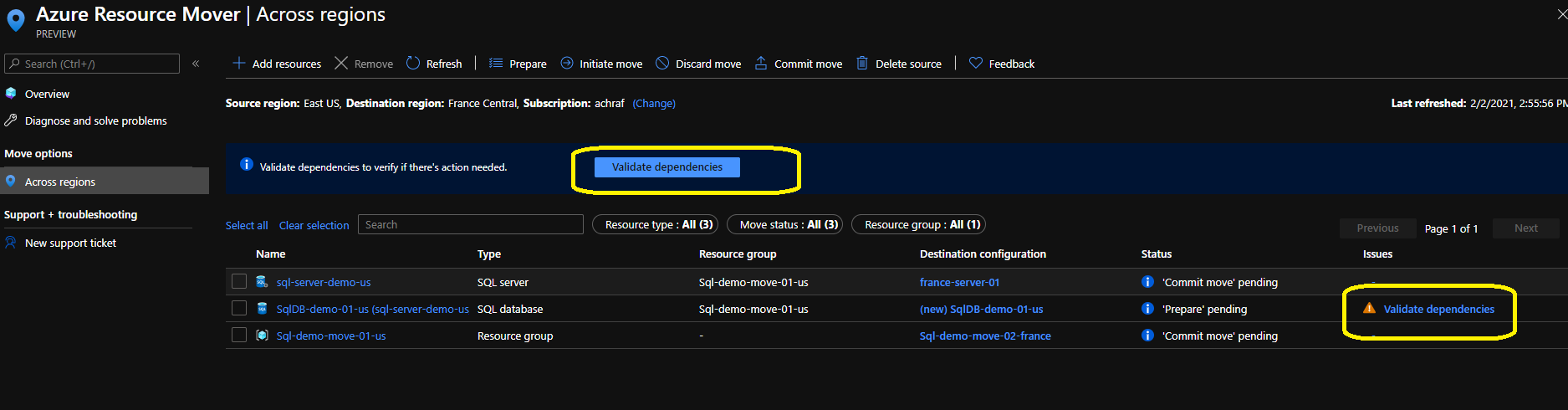
Here we are going to start the moving process :

  • In Move resources > Source + destination, select the source subscription and region.
  • In Destination, select the region to which you want to move the resources. Then click Next.

  • In Resources to move, click Select resources.
  • In Select resources, select the resources. You can only add resources supported for move. Then click Done.


ShareTweet
Previous Post

Background Tasks With Hangfire And .Net 5

Next Post

Azure Automation : How to create PowerShell Runbook

Related Posts

AI

I Let Five-AI Agents Build My App. Here’s Exactly What Happened.

May 20, 2026
48
AI

GitHub Copilot Skills for Terraform: 5 On-Demand AI Assistants for Azure Container Apps

March 29, 2026
206
Azure

From Terraform to Autopilot: AI-Assisted Automation for Azure Container Apps  Part 3

March 29, 2026
1.6k
Azure

Building a Microservices Architecture on Azure Container Apps with Terraform Part 2

March 1, 2026
183
Blog

 2025 – Certifications, Community, and 50K Views

December 28, 2025
136
Azure

From Manual Terraform to AI-Assisted DevOps: Building an Azure Container Platform (Part 1)

December 23, 2025
308
Next Post
Azure Automation :  How to create PowerShell Runbook

Azure Automation : How to create PowerShell Runbook

Leave a Reply Cancel reply

Your email address will not be published. Required fields are marked *

Terraform

Certifications

Microsoft certified trainer (MCT)

Recommended

The Differences Between Blazor Server And Blazor  WebAssembly

The Differences Between Blazor Server And Blazor WebAssembly

January 10, 2021
911
Hello Microsoft Graph !

Hello Microsoft Graph !

February 25, 2021
594
Microsoft Teams

What’s new in Microsoft Teams

September 4, 2020
372

Building a Microservices Architecture on Azure Container Apps with Terraform Part 2

March 1, 2026
183
Kubernetes is deprecating Docker runtime support !

Kubernetes is deprecating Docker runtime support !

December 3, 2020
829
Create a Linux VM with infrastructure in Azure using Terraform

Create a Linux VM with infrastructure in Azure using Terraform

August 30, 2020
2.4k
Facebook Twitter LinkedIn Youtube

I Let Five-AI Agents Build My App. Here’s Exactly What Happened.

May 20, 2026

GitHub Copilot Skills for Terraform: 5 On-Demand AI Assistants for Azure Container Apps

March 29, 2026

From Terraform to Autopilot: AI-Assisted Automation for Azure Container Apps  Part 3

March 29, 2026

Categories

  • AI (5)
  • Apps (1)
  • Azure (70)
  • blazor (2)
  • Blog (98)
  • c# (7)
  • Cloud (72)
  • copilot (3)
  • Courses (4)
  • Dapr (4)
  • docker (4)
  • Games (1)
  • General Tips & Fix (1)
  • Home (1)
  • Kubernetes Service (AKS) (1)
  • Motivation (3)
  • motivation (2)
  • News (9)
  • Resume (1)
  • sql (4)
  • Terrafrom (2)
  • Tricks, Tips and Fixes (4)
  • xamarin (5)
No Result
View All Result
  • Home
  • News
  • Blog
    • blazor
    • c#
    • Cloud
      • Azure
    • docker
    • sql
    • xamarin
    • Dapr
    • Tricks, Tips and Fixes
    • General Tips & Fix
  • AI
  • Cloud
  • Motivation
  • Courses
  • About
    • Resume
    • Privacy Policy