Achraf Ben Alaya
No Result
View All Result
  • Home
  • News
  • Blog
    • blazor
    • c#
    • Cloud
      • Azure
    • docker
    • sql
    • xamarin
    • Dapr
    • Tricks, Tips and Fixes
    • General Tips & Fix
  • AI
  • Cloud
  • Motivation
  • Courses
  • About
    • Resume
    • Privacy Policy
SUBSCRIBE
  • Home
  • News
  • Blog
    • blazor
    • c#
    • Cloud
      • Azure
    • docker
    • sql
    • xamarin
    • Dapr
    • Tricks, Tips and Fixes
    • General Tips & Fix
  • AI
  • Cloud
  • Motivation
  • Courses
  • About
    • Resume
    • Privacy Policy
No Result
View All Result
Achraf Ben Alaya
No Result
View All Result
ADVERTISEMENT
Home Blog Cloud Azure

Configure Azure Web App Logging With .NET 5

achraf by achraf
December 11, 2020
in Azure, Blog, Cloud
2 min read
0
Configure Azure Web App Logging With .NET 5
0
SHARES
2.4k
VIEWS
Share on FacebookShare on Twitter

The Azure App Service web apps provide diagnostic functionality for logging information from both the web server and the web application. It logically separates this into web server diagnostics and application diagnostics. When you enable this feature in Azure, you can specify a log data storage account and container for each of these to save them .

Full demo : 


Enable the filesystem logs on Azure Portal

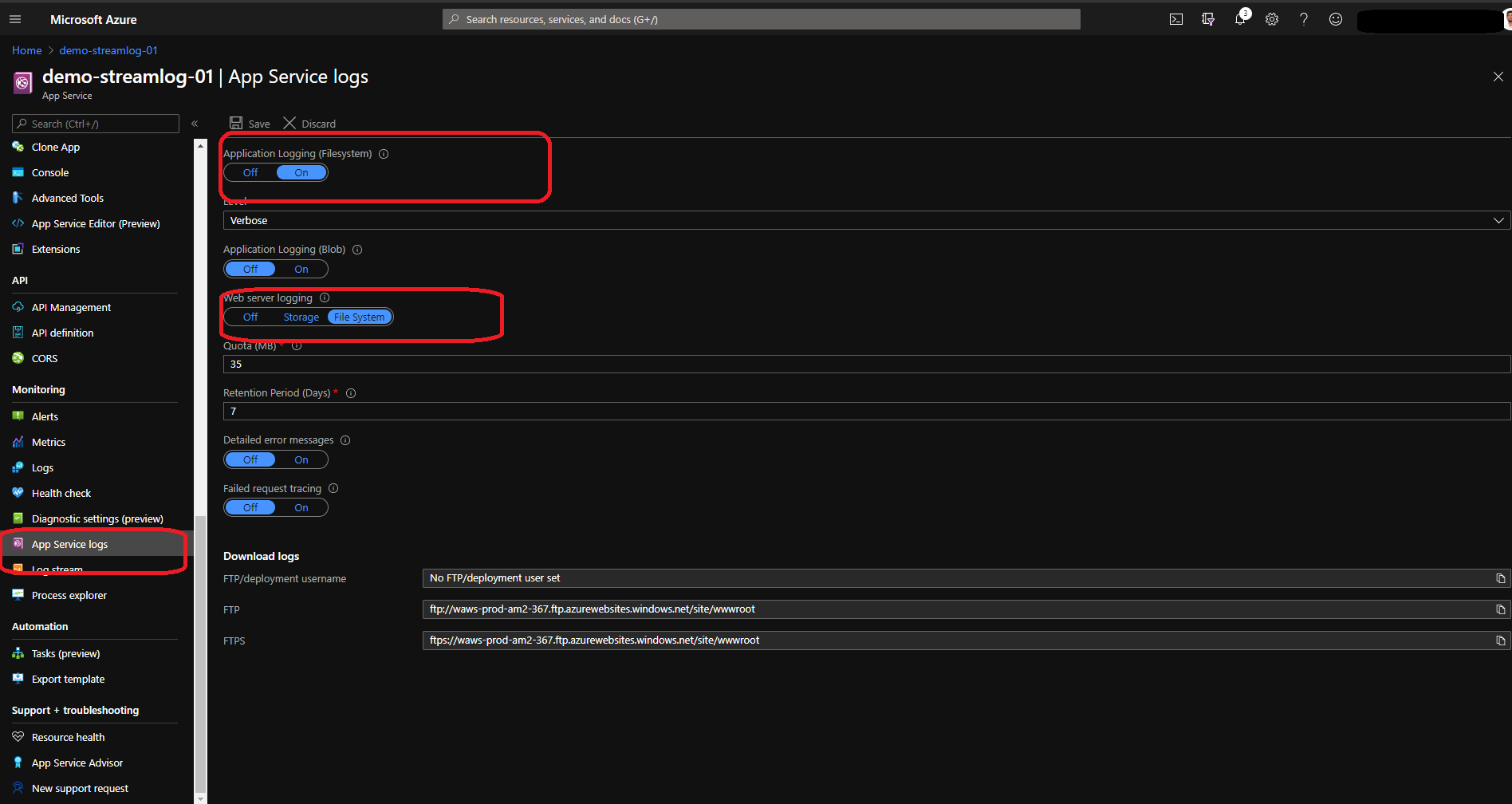
In order to activate the logs here , after you create the web application ,we need to go to Monitoring and go to App Service logs  and we need to activate Application Logging (Filesystem) and change Web server logging to File System .

Add the configuration code

First of all ,we need to install the package  : Microsoft.Extensions.Logging.AzureAppServices from this link .
Next we are going to do some changes inside the Program.cs

public class Program
  {
      public static void Main(string[] args)
      {
          CreateHostBuilder(args).Build().Run();
      }

      public static IHostBuilder CreateHostBuilder(string[] args) =>
      Host.CreateDefaultBuilder(args)
           .ConfigureWebHostDefaults(webBuilder =>
           {
               webBuilder
               .UseStartup<Startup>()
               .ConfigureLogging(logging =>
               {
                   logging.ClearProviders();
                   logging.AddConsole();
                   logging.AddAzureWebAppDiagnostics();
               });
           });
  }


Add Logs

Inside our controllers , we will find already the logs implemented ,all we need to do is to add few lines depends of the type of the logs that you want to write :

_logger.LogInformation("LogInformation  WeatherForecast");
_logger.LogWarning("LogWarning  WeatherForecast");
_logger.LogDebug("LogDebug  WeatherForecast");


Watch our logs
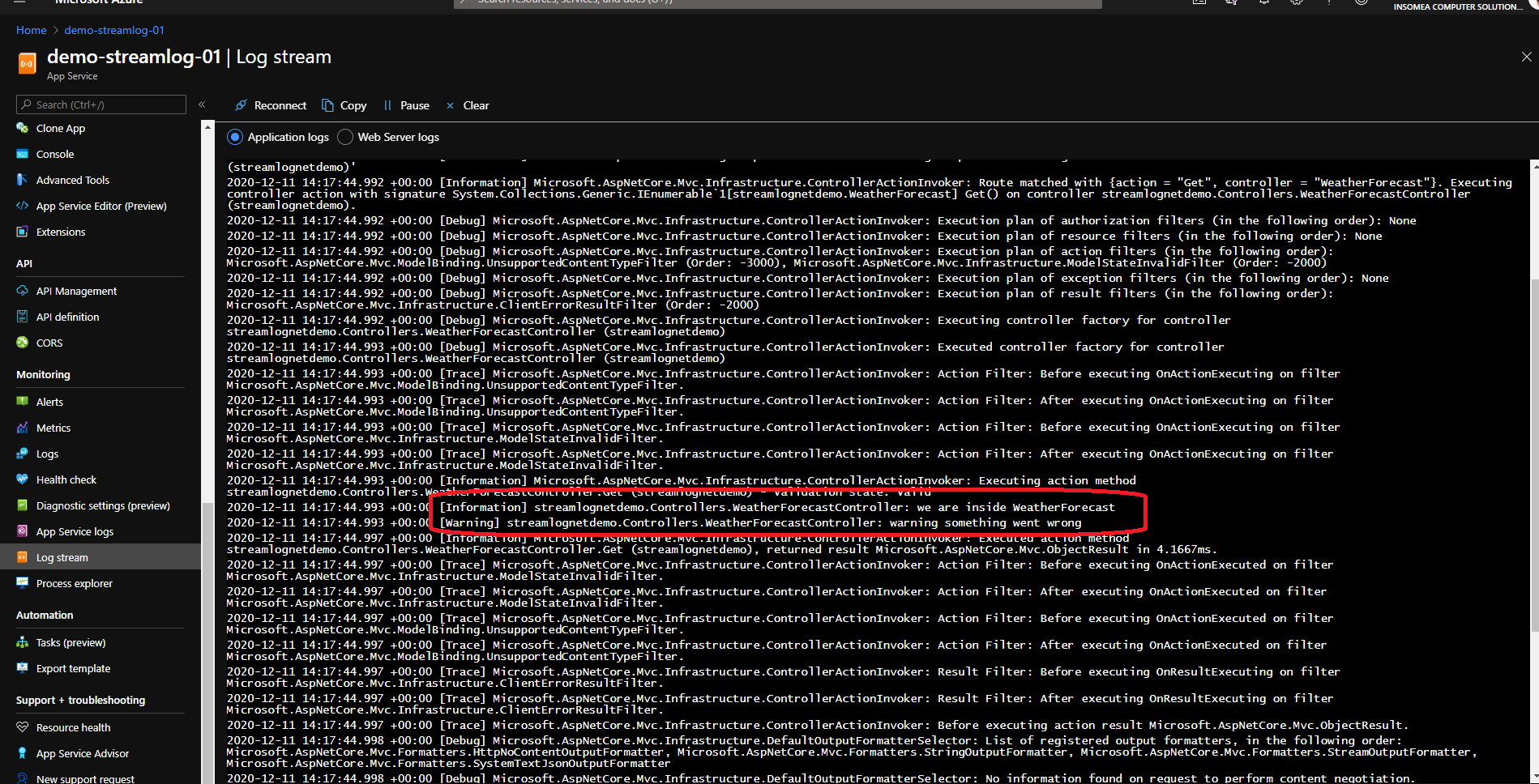
 

Well , that was our quick demo about the logs on azure ,to read more about it on Microsoft website link


ShareTweet
Previous Post

FIX – YouTube Thumbnail Not Showing on Facebook

Next Post

Recover a deleted storage account azure

Related Posts

Blog

 2025 – Certifications, Community, and 50K Views

December 28, 2025
17
Azure

From Manual Terraform to AI-Assisted DevOps: Building an Azure Container Platform (Part 1)

December 23, 2025
14
AI

Build and Host an Expense Tracking MCP Server with Azure Functions

November 2, 2025
701
Azure

Log Analytics Workspace Chaos: How We Tamed 100+ Orphaned Workspaces

October 17, 2025
195
Azure

Honored to be recognized as a Microsoft Azure MVP for 2025-2026

July 20, 2025
132
AI

Model Context Protocol (MCP): The Future of AI Integration

April 21, 2025
309
Next Post
Recover a deleted storage account azure

Recover a deleted storage account azure

Leave a Reply Cancel reply

Your email address will not be published. Required fields are marked *

Terraform

Certifications

Microsoft certified trainer (MCT)

Recommended

Auto Post and Schedule Tweets & Linkedin using Azure Logic Apps

Auto Post and Schedule Tweets & Linkedin using Azure Logic Apps

April 14, 2021
651
Navigating Azure Identities: System-Assigned vs. User-Assigned with Real-World Scenarios

Navigating Azure Identities: System-Assigned vs. User-Assigned with Real-World Scenarios

October 9, 2023
415
Navigating the Alphabet Soup: Unraveling Microsoft Acronyms

Navigating the Alphabet Soup: Unraveling Microsoft Acronyms

July 16, 2023
279
What if we can check the cost of Azure resources in a juts few seconds

What if we can check the cost of Azure resources in a juts few seconds

May 9, 2023
567
Dapr – Service Invocation Part 1/2

Dapr – Service Invocation Part 1/2

August 17, 2021
871
Automated Monitoring of Azure App Registration Secrets with Automation Accounts and Logic Apps

Automated Monitoring of Azure App Registration Secrets with Automation Accounts and Logic Apps

October 7, 2024
1k
Facebook Twitter LinkedIn Youtube

 2025 – Certifications, Community, and 50K Views

December 28, 2025

From Manual Terraform to AI-Assisted DevOps: Building an Azure Container Platform (Part 1)

December 23, 2025

Build and Host an Expense Tracking MCP Server with Azure Functions

November 2, 2025

Categories

  • AI (3)
  • Apps (1)
  • Azure (67)
  • blazor (2)
  • Blog (94)
  • c# (7)
  • Cloud (69)
  • Courses (4)
  • Dapr (4)
  • docker (4)
  • Games (1)
  • General Tips & Fix (1)
  • Home (1)
  • Kubernetes Service (AKS) (1)
  • motivation (2)
  • Motivation (3)
  • News (9)
  • Resume (1)
  • sql (4)
  • Terrafrom (2)
  • Tricks, Tips and Fixes (4)
  • xamarin (5)
No Result
View All Result
  • Home
  • News
  • Blog
    • blazor
    • c#
    • Cloud
      • Azure
    • docker
    • sql
    • xamarin
    • Dapr
    • Tricks, Tips and Fixes
    • General Tips & Fix
  • AI
  • Cloud
  • Motivation
  • Courses
  • About
    • Resume
    • Privacy Policy

ADVERTISEMENT